Comparison
Divall vs. Splitwise, Tricount and budgeting apps
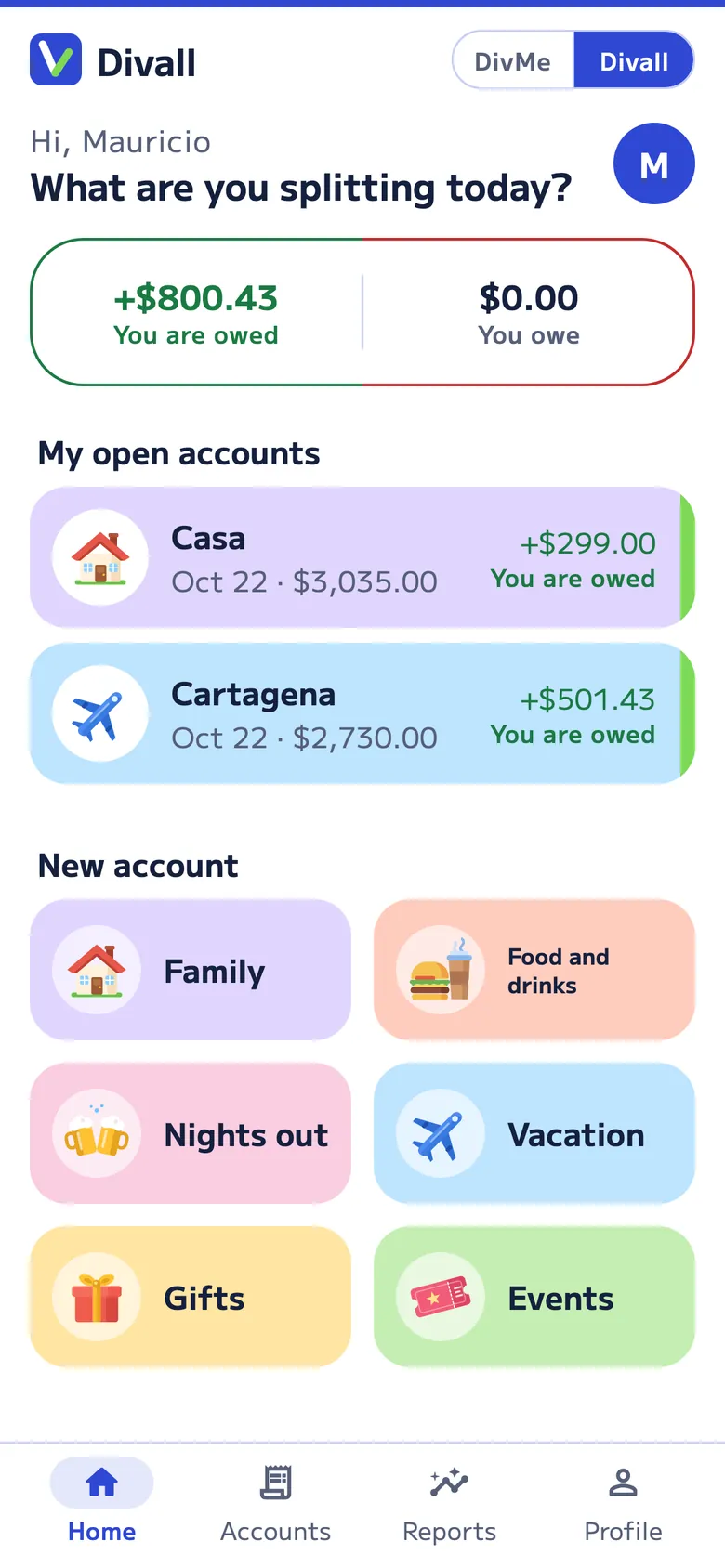
Bill-splitting apps tell you who owes whom. Budgeting apps tell you what you have left. Divall does both and connects them: your share of a dinner goes straight to your month.
In short
- Splitwise and Tricount split expenses, but they don’t keep your personal budget. Splitwise’s help center says it isn’t a full personal finance tool, and Tricount removed its personal mode.
- YNAB and Monefy keep your budget, but they don’t split expenses with other people: sharing a budget with your partner isn’t the same as knowing who owes whom.
- Divall does both in one app: each occasion splits its own way (item by item with the tip shared fairly, by day, by month or by list) and your share goes straight to your month in DivMe.
- Divall is coming soon to the App Store and Google Play; the others are already available.
At a glance
What each app does
Two bill-splitting apps, two personal budgeting apps, and Divall, which does both.
| Feature | Divallsplitting + your month | Splitwisesplitting | Tricountsplitting | YNABbudgeting | Monefybudgeting |
|---|---|---|---|---|---|
| Splitting expenses with others | |||||
| Split expenses and see who owes whom | Yes | Yes | Yes | No | No |
| Split the receipt item by item | Yes | Yes | Not mentioned | — | — |
| Receipt photo that reads the items | Free, 10 readings every 30 days; Pro, 300 a month | Pro | Attaches the photo only | — | — |
| Tip split by what each person had | Yes | Lets you add the tip; doesn’t say how it’s split | Not mentioned | — | — |
| Unequal splits | By item, groups, kids who pay ½ and percentages | Shares, percentages and exact amounts | Shares and amounts | — | — |
| People without the app | By name | By name | With a link | — | — |
| Simplify debts | Yes | Yes | Yes | — | — |
| Recurring costs that add themselves | Yes (Family, Pro) | Yes | No: added by hand | — | — |
| Your month | |||||
| Personal monthly budget | Yes, DivMe | No: says it isn’t a personal finance tool | No: personal mode is gone | Yes | Yes |
| Your share of shared costs goes straight to your budget | Yes | No | No | No: its help explains how to log Splitwise by hand | No |
| Bank | Imports your statement (Excel or CSV) | Connects a card (Pro, select countries) | bunq card only | US, Canadian, UK and EU banks, or file import | Imports statements, no bank login |
| Price and availability | |||||
| Price | Free; Pro US$4.99 a month or US$49.99 a year | Free; Pro monthly or yearly, varies by country | Free | US$14.99 a month or US$109 a year | Free; paid Premium |
| Free version limit | 20 accounts every 30 days, 2 open at a time, across Food and drinks, Nights out, Events and Gifts | 4 expenses a day | No limit | No free version: 34-day trial | Unlimited accounts and recurring transactions are Premium |
| In Spanish | Yes | Yes | Yes | No, English only | Yes |
| Where | Coming soon on iOS and Android; web with Pro | iOS, Android and web | iOS and Android | iOS, Android and web | iOS and Android |
Information on each app comes from its official website, help center and US App Store and Google Play listings, checked on October 19, 2026. Prices and features can change; sources are listed at the end of the page.
The 2-in-1 advantage
Log it once, not twice
With two apps, a dinner gets logged twice: in the splitting app, to see what each person owes, and again in the budgeting app, so your month adds up. And if you paid the whole bill, you have to remember who owes you and subtract it when they pay you back.
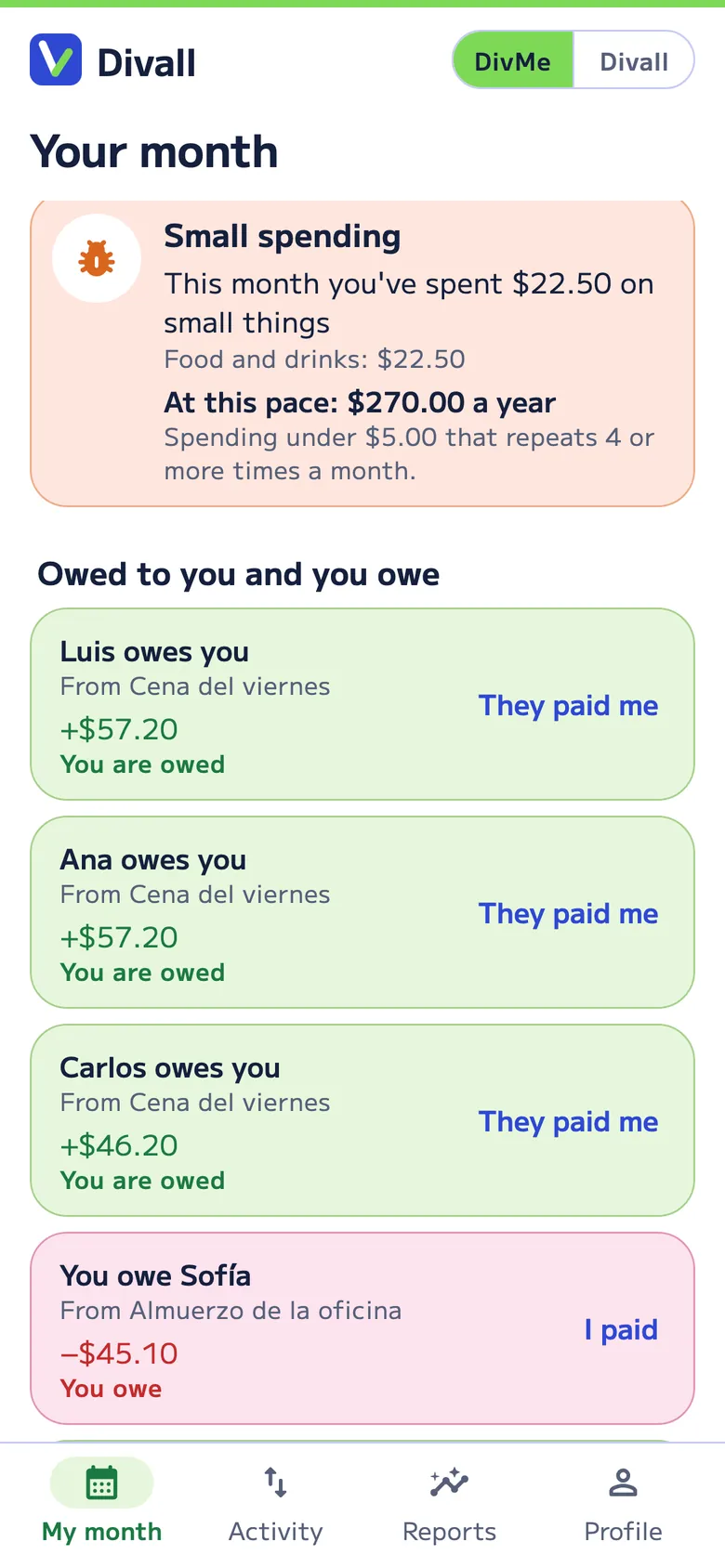
In Divall, your share of the dinner goes straight to DivMe as spending. If you paid, DivMe shows who owes you and you mark it when they pay. Your month stays up to date without copying anything from one app to another.
- Your whole month. Personal and shared spending together, in your currency.
- What’s yours stays yours. Only you see your DivMe; in a shared account, everyone sees that account only.
- Small spending. DivMe finds the small purchases that repeat and shows what they add up to in a year.
Divall vs. Splitwise
Splitwise is the best-known bill-splitting app. It splits equally, by shares, percentages, exact amounts or items; simplifies debts; has recurring bills, 100+ currencies and a web version. On the free version you can add up to 4 expenses a day; receipt scanning, currency conversion, spending-by-category charts and an ad-free experience are part of Splitwise Pro.
Divall is different in two ways:
- Each occasion, its own way. In Divall a dinner splits the tip by what each person had and adds the share of anyone being treated; a party has groups like “Drink alcohol”; a trip has kids who pay half and families who pay together; the household has its agreement, its budget and its month-end close; gifts and events have their list of who buys or brings what.
- Your month. Splitwise’s help center says it’s designed for splitting expenses with other people and isn’t a full personal finance tool. Divall includes DivMe: your income and spending, recurring costs, cards, savings and small spending, with your shared costs already in it.
Divall vs. Tricount
Tricount, owned by bunq, is free with no expense limit. It splits by amounts or shares, works offline and lets others view and add expenses with a link, without installing the app. Recurring bills are added by hand, CSV export is requested by email, and its personal mode is no longer available.
Divall adds what Tricount doesn’t mention: splitting the receipt item by item, reading it from a photo and splitting the tip by what each person had. And, above all, your personal budget in the same app.
Divall vs. budgeting apps (YNAB and Monefy)
YNAB is a budgeting app with targets, charts and direct import from US, Canadian, UK and EU banks. It costs US$14.99 a month or US$109 a year, with a 34-day trial, and it’s in English only. YNAB Together lets you share the subscription and budgets with up to five people, and its “split transaction” divides one payment across categories, not across friends: for that, its own help center explains how to use it alongside Splitwise.
Monefy logs a purchase in two taps, has a budget mode and doesn’t ask for a bank login. The core app is free and Premium adds unlimited accounts and recurring transactions. You can share the budget with a partner by syncing through Google Drive or Dropbox, but it doesn’t split expenses or show who owes whom.
Divall keeps your month like a budgeting app (income, spending, categories, recurring costs, cards, savings and reports) and also splits what you share. If your month includes dinners with friends, a trip or a home with roommates, it’s already in your numbers.
When another app may suit you better
- If you need it today: Divall is coming soon to the stores.
- If you only split now and then and never want to pay: Tricount is free with no expense limit.
- If you want your bank connected automatically and you live in the US, Canada, the UK or the EU: YNAB does that; Divall imports your statement as Excel or CSV.
- If you mostly use a computer: Splitwise and YNAB have web versions; in Divall, the web comes with Pro.
Frequently asked questions
Is Divall an alternative to Splitwise?
Yes. It splits expenses with friends, on trips and at home, shows who owes whom and simplifies debts. It also keeps your personal budget in DivMe, which Splitwise doesn’t have.
Which one is free?
Tricount is free. Splitwise, Monefy and Divall have a free version with limits and a paid one. YNAB has no free version, only a trial.
Can Divall replace my budgeting app?
It can: DivMe tracks income, spending, recurring costs, cards, savings and reports, and adds your share of shared accounts for you. It doesn’t connect to your bank; you import your statement as Excel or CSV.
If I pay the whole bill and friends pay me back, does it count as income?
No. In DivMe only your share counts as spending; what others owe you shows under “You are owed”, and when they pay, “They paid me” records it as a transfer that closes the debt, not as income. So what people pay you back doesn’t inflate your income.
Can I download Divall now?
Divall is coming soon to the App Store and Google Play. The web version is already open at app.divall.app and works with Divall Pro.
Sources
Checked on October 19, 2026. Splitwise: What is Splitwise Pro?, personal expenses, ways to split, Splitwise Pro, Google Play. Tricount: features, FAQ, end of Premium, Tricount vs. Splitwise, terms. YNAB: pricing, YNAB Together, Splitwise and YNAB, App Store. Monefy: website and FAQ, help center, Google Play.
Splitwise, Tricount, YNAB and Monefy are trademarks of their respective owners. Divall is not affiliated with them. If you spot something out of date, email us at hello@inads.ai.