Splitwise alternative
A Splitwise alternative that also runs your month
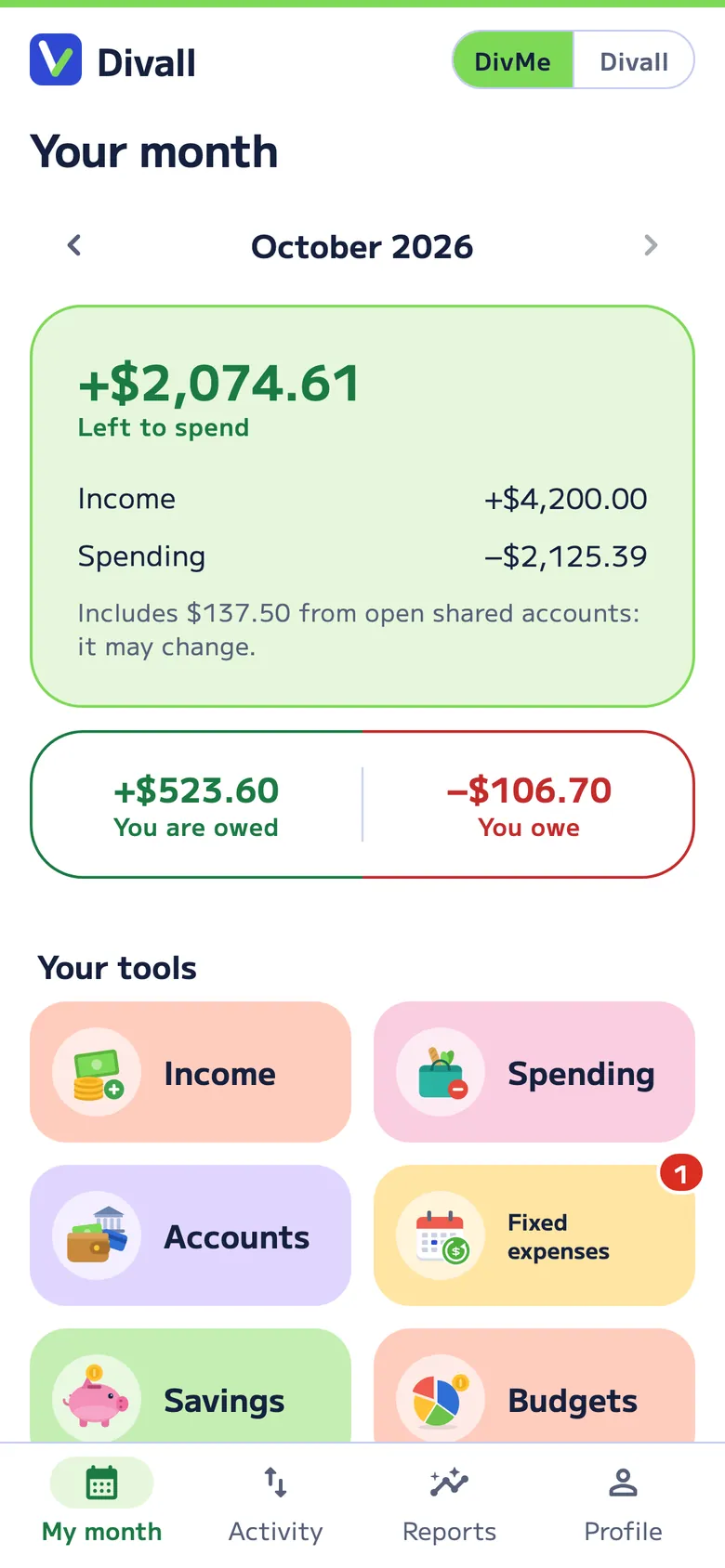
Divall splits expenses the way you do in Splitwise —who owes whom, simplified debts and friends without the app— and also runs your budget in DivMe: your share of every account goes straight to your month.
In short
- Why people look for an alternative: Splitwise’s free version lets you add up to 4 expenses a day, and receipt scanning, currency conversion and an ad-free experience are part of Splitwise Pro.
- What Divall does differently: it splits by what each person actually had, with the tip shared in proportion, and it runs your month in DivMe. Splitwise’s own help says it isn’t a full personal finance tool.
- Free in Divall: Food and drinks, Nights out, Events and Gifts (20 accounts every 30 days, 2 open at a time), 10 AI receipt readings every 30 days and DivMe for your month.
- Divall is coming soon to the App Store and Google Play; Splitwise is available now.
Splitwise vs. Divall
What changes when you switch from Splitwise to Divall
| Feature | Divallsplit + your month | Splitwisesplit expenses |
|---|---|---|
| Splitting with others | ||
| Who owes whom, with simplified debts | Yes | Yes |
| Split the bill item by item | Yes | Yes |
| Receipt photo that reads the items | Free, 10 readings every 30 days; Pro, 300 a month | Pro |
| Tip shared by what each person had | Yes | Lets you add the tip; doesn’t say how it’s shared |
| People without the app | By name | By name, on the web |
| Recurring costs that add themselves | Yes (Family, Pro) | Yes |
| Your month | ||
| Personal monthly budget | Yes, DivMe | No: its help says it isn’t a full personal finance tool |
| Your share of shared costs goes straight to your budget | Yes | No |
| Price and availability | ||
| Price | Free; Pro US$4.99 a month or US$49.99 a year | Free; Pro monthly or yearly, priced by country |
| What the free version limits | 20 accounts every 30 days, 2 open at a time, across Food and drinks, Nights out, Events and Gifts | 4 expenses a day (no limit if you pay with its card, US only) |
| Where it runs | Coming soon to iOS and Android; web with Pro | iOS, Android and web |
Splitwise details taken from its website, help center and US App Store and Google Play listings on November 1, 2026. They may change; sources are at the bottom of the page. The comparison with Tricount and budgeting apps is in Divall vs. Splitwise.
Why switch from Splitwise to Divall
- Your month in the same app. With Splitwise, your share of a dinner has to be entered again in another app if you want your budget to add up. In Divall it goes straight to DivMe, next to your income, spending, fixed costs, cards and savings. Meet DivMe.
- Every occasion, its own way. A dinner shares the tip by what each person had; a night out has groups like “drinking alcohol”; a trip has kids who pay half; the household has its budget and month-end close.
- Receipt photos, free too. In Splitwise it’s a Pro feature; in Divall you get 10 readings every 30 days without paying, and you review the items before adding them.
- Your friends don’t have to switch. Add them by name and share what they owe. If they want, they join with a QR code, a link or their @username.
How to switch from Splitwise to Divall
- Settle what’s open. Have everyone pay what they owe in Splitwise, or write down today’s balances and settle them separately.
- Keep your history. Splitwise lets you export each group as a spreadsheet, on the web or in the app: keep it in case you need to check something later.
- Create the account for the occasion. Food and drinks, Nights out, Events and Gifts are free; Family and roommates and Vacation are Divall Pro.
- Add the people. By name, no app needed; anyone who wants to see it on their phone can join with a QR code or a link.
When Splitwise may suit you better
- If you need an app today: Divall is coming soon to the stores.
- If you share a home or a trip and never want to pay: in Divall, Family and Vacation are Pro.
- If you live on your computer and don’t want to pay: Splitwise has a web version; in Divall, the web comes with Pro.
Frequently asked questions
If I switch to Divall, do my friends have to switch too?
No. Add them by name and share what they owe. If they want to see the account on their phone, invite them with a QR code, a link or their @username.
Can I move my Splitwise groups to Divall?
There’s no direct connection with Splitwise. The simplest way is to settle up and start new accounts in Divall. With Divall Pro, on the web you can upload your history from an Excel or CSV file: AI reads it and you review what it found before confirming.
How much does Divall cost?
There’s a Free plan that never expires. Divall Pro costs US$4.99 a month or US$49.99 a year, with a 7-day free trial, and it’s paid only in the app, through the App Store or Google Play.
Can I download Divall yet?
Divall is coming soon to the App Store and Google Play. The web version is already open at app.divall.app and works with Divall Pro.
Sources
Checked on November 1, 2026. Splitwise: What is Splitwise Pro?, Splitwise Pro, Splitwise Card, personal expenses, ways to split, adding a friend without email, exporting your data, App Store, Google Play.
Splitwise is a trademark of its owner. Divall isn’t affiliated with Splitwise. If you spot something out of date, email us at hello@inads.ai.